
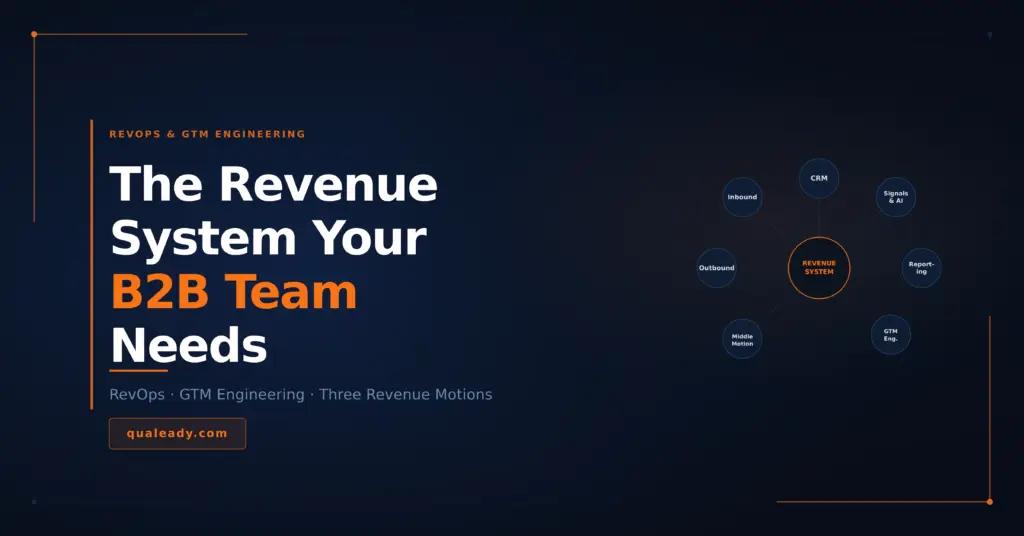
RevOps GTM Engineering is reshaping how B2B revenue teams build pipeline.
There’s never been more tools, more data, or more process documentation than there is today.
And pipeline has never been harder to build consistently.
That gap is not a coincidence. The promise of RevOps — aligned teams, clean data, predictable revenue — has been around for nearly a decade. Companies that implemented it often got dashboards. Some got better reporting. Very few got the thing they actually needed: a system where sales, marketing, and customer success operate from the same model and produce compounding results instead of competing outputs.
The GTM Engineer role emerged because someone finally had to build that system rather than just manage it. This article is about what that means, why it matters, and what a modern revenue infrastructure actually looks like in 2026.
What RevOps Was Supposed to Fix
The problem RevOps was designed to solve is simple to describe and hard to fix.
Sales, marketing, and customer success each developed their own operational functions over time. Sales Ops managed the CRM, forecasting, and territory planning. Marketing Ops ran the automation platform, lead scoring, and campaign reporting. Customer Success Ops tracked renewals, NPS, and expansion revenue. Each function had its own tools, its own definitions, and its own metrics.
The result was a revenue organization that looked aligned on an org chart and operated in silos in practice. Marketing measured MQLs. Sales measured opportunities. Neither measurement connected cleanly to revenue. A lead that marketing called qualified might be rejected by sales within 48 hours. A prospect that sales lost track of would never be seen again. Customer signals that should have triggered upsell conversations sat unread in a CS tool that sales never opened.
RevOps was supposed to bring these functions under one operational umbrella — shared definitions, shared data, shared accountability for revenue outcomes. In theory it was exactly right. In practice, many RevOps teams became a fourth silo: a reporting function that produced dashboards leadership looked at in QBRs and promptly forgot.
The gap between RevOps as a concept and RevOps as a functioning system is where the GTM Engineer lives.
The GTM Engineer — What the Role Actually Is
The GTM Engineer title started appearing seriously around 2023 and has grown rapidly since. It sits at the intersection of revenue strategy, data infrastructure, and systems thinking — and it exists because the modern go-to-market motion requires someone who can actually build the connections between tools, data, and teams rather than just report on them.
The term was coined by Clay in 2023. They didn’t invent the underlying work — enrichment workflows, pipeline automation, and data infrastructure were already being done inside RevOps teams under various titles. What Clay did was give it a name, build a community around it, and frame go-to-market as an engineering discipline rather than a people-and-relationships function. The role took off fast. Around 100 GTM Engineer job listings now go live every month — at companies like Cursor, Webflow, and beyond — and the category continues to grow independently of any single tool or platform.
A RevOps manager typically owns process documentation, reporting, and CRM hygiene. They define the system. A GTM Engineer builds and maintains it. They write the workflows, configure the integrations, connect the data sources, and ensure that when a signal fires in one part of the stack it triggers the right action in another.
In practical terms a GTM Engineer might:
- Build a workflow that automatically enriches a new inbound lead with firmographic and technographic data before it reaches a sales rep
- Create a signal-based routing system that sends high-intent website visitors directly to the right account executive with context attached
- Connect outbound sequences to CRM deal stages so that when a prospect replies the sequence pauses and the rep gets a notification with full context
- Set up a re-engagement trigger that moves a cold opportunity into a nurture track after 60 days of inactivity
- Build reporting that shows pipeline by source, by stage, by rep, and by time — in one place, updated automatically
This is not a new category of work. It’s work that always needed to happen but got distributed across sales reps, marketing managers, and whoever was most technical on the team. The GTM Engineer role centralizes it and gives it proper ownership.
Not every company needs a dedicated GTM Engineer. But every company needs someone doing this work. In smaller teams that’s often a RevOps generalist, a technical marketing hire, or an agency that builds and maintains the system on their behalf.
The Three Motions a Modern Revenue System Needs to Handle
Most RevOps implementations are built around one motion: inbound. A lead comes in, gets scored, gets routed to sales, gets worked. That process is well understood and reasonably well-tooled.
The problem is that inbound is only one of three revenue motions a modern B2B team runs — and the other two are almost always underserved by the system.
Motion 1 — Inbound
The most mature motion in revenue organizations. A prospect takes an action — fills out a form, books a demo, downloads a resource, visits a high-intent page — and the system responds. Lead scoring determines priority. Routing rules determine which rep picks it up. SLAs determine how fast.
Where inbound systems typically break down: lead scoring models that don’t reflect actual buyer behavior, routing logic that ignores account-level context, and handoff processes that drop context between marketing and sales. A lead that marketing nurtured for three months arrives in a sales rep’s queue with no history attached.
Motion 2 — Outbound
The most manually intensive motion and the one where system gaps cause the most wasted effort. Reps spend time building lists that should be built automatically. Sequences run without signal-based logic. Follow-ups happen on a timer rather than in response to behavior. CRM records get updated inconsistently, which means pipeline reporting is unreliable.
A well-engineered outbound motion looks different. Account and contact data flows in from enrichment tools automatically. Sequences pause when a prospect shows high intent and resume when they go dark. Every touchpoint is logged. Every reply triggers a rep notification with context. The system does the operational work so the rep can focus on the conversation.
Motion 3 — The Middle Motion
This is the most overlooked and arguably the most valuable.
A prospect who had two sales calls but didn’t sign is not a cold lead. They know who you are. They understood the offer. Something got in the way — budget, timing, internal priorities, a competing project. Treating them like a cold outbound prospect by adding them back to a generic sequence is the wrong move. Dropping them entirely is worse.
The middle motion is a structured, low-touch nurture track for prospects who engaged but didn’t convert. It’s distinct from both inbound nurture and outbound prospecting. The content is more specific — product updates relevant to the challenges they discussed, case studies from companies in their situation, industry insights that connect to the conversation you already had. The tone is warmer because there’s a relationship to reference. The goal isn’t to re-pitch — it’s to stay visible and relevant until the timing changes.
In practice this requires the CRM to be configured to capture why a deal was lost or paused, not just that it was. “No decision — timing” is a different track than “No decision — not the right fit.” One goes into a six-month nurture cadence. The other goes into a suppression list.
When a signal fires from that nurture track — a prospect opens three emails in a week, visits the pricing page, or engages with content — that’s the trigger for a personal re-engagement from the account owner. Not an automated sequence. A human message that references the original conversation and acknowledges the time that’s passed.
This motion closes deals that get left on the table permanently.
What Alignment Actually Means in 2026
Alignment is one of the most overused words in B2B revenue. What it means in practice is specific and operational.
Shared definitions. What counts as a Marketing Qualified Lead? What makes a Sales Accepted Lead? When does an opportunity move from one stage to the next? These definitions need to exist in writing, be reflected in the CRM, and be agreed on by both sales and marketing leadership. When they don’t exist, every pipeline review becomes a negotiation about what the numbers mean rather than a conversation about what to do.
Clear handoffs. The moment a lead moves from marketing to sales needs to be explicit, tracked, and time-bound. Marketing hands off with context — what the prospect engaged with, what signals triggered the handoff, what they know about the account. Sales acknowledges receipt and commits to a response time. When handoffs are vague, leads fall through the gap between teams and nobody knows whose fault it is.
Service Level Agreements. SLAs between marketing and sales are uncomfortable to establish and essential to enforce. Marketing commits to delivering a certain volume and quality of leads. Sales commits to working them within a defined timeframe. Both commitments are measured and reviewed. Without SLAs, both teams operate on assumptions and blame each other when pipeline is short.
One source of truth. Every revenue decision — forecasting, resource allocation, campaign investment, hiring — should be made from the same data. When sales is reporting from the CRM, marketing is reporting from the automation platform, and finance is working from a spreadsheet, the numbers will never match and trust between teams erodes. A functioning RevOps system means one dashboard that everyone trusts because everyone knows how it’s built.
The Tools That Power Modern RevOps and GTM Engineering
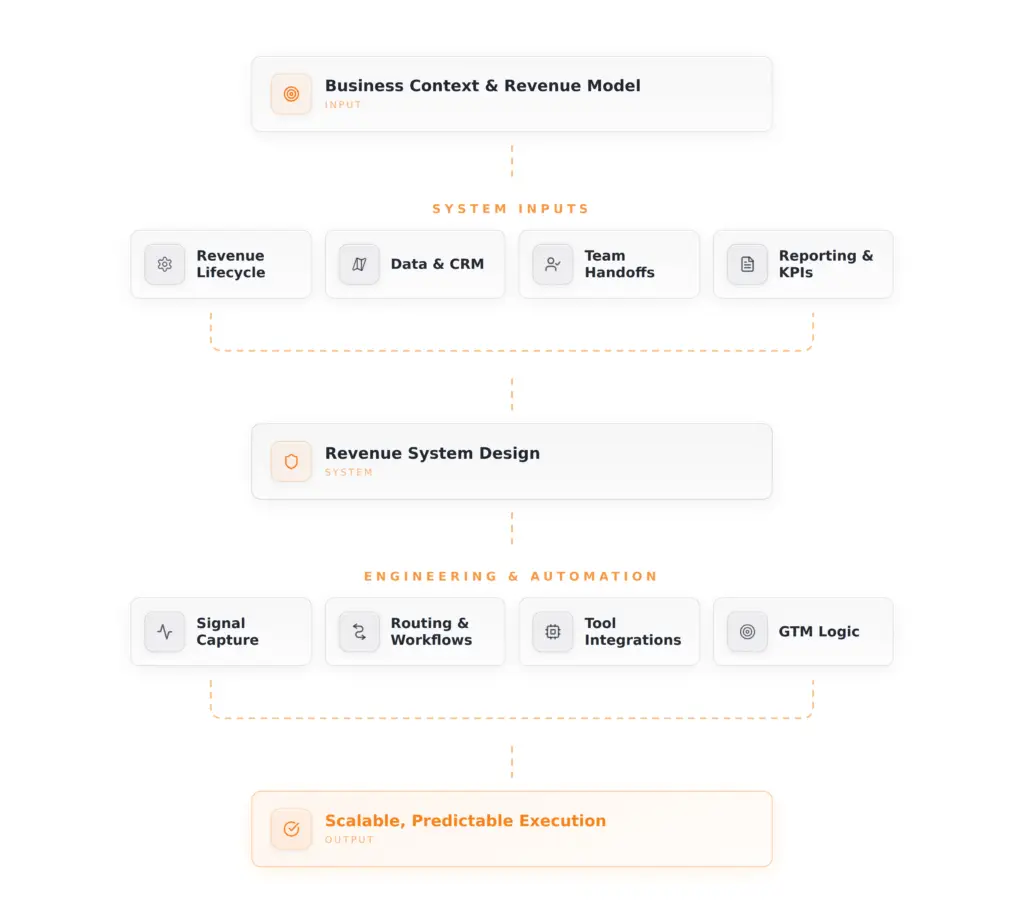
Tools don’t create alignment. But the right stack makes alignment maintainable at scale. The way to think about this isn’t as a list of categories — it’s as a connected system. Data flows in, gets enriched and interpreted, triggers the right actions, and feeds back into reporting. Every layer depends on the one before it.
The CRM — Foundation of Everything
The CRM is where the revenue system lives. Every other tool either feeds into it or reads from it. Getting this wrong is expensive — both to fix and to operate around.
HubSpot is the most common choice for B2B teams at the growth stage. Strong marketing automation, solid sales CRM, good reporting, and a wide ecosystem of native integrations. The all-in-one nature is a genuine advantage for teams that don’t want to manage multiple disconnected platforms. HubSpot also has AI capabilities built in — predictive lead scoring, deal health indicators, and conversation intelligence — which matter more as your contact volume grows.
Salesforce is the enterprise standard. More powerful, more configurable, significantly more complex, and considerably more expensive to implement and maintain. Worth it at scale. Overkill for teams under 50 people in revenue.
Pipedrive is a strong option for sales-led teams that want a clean, simple pipeline tool without the overhead of a full marketing automation suite. Easier to adopt and maintain. Less powerful on the marketing side.
GoHighLevel is worth knowing — particularly for agencies and smaller B2B teams running both marketing and sales from one platform. It combines CRM, email and SMS automation, landing pages, and pipeline management in a single tool. It trades depth for breadth, which works well for certain business models and less well for complex enterprise sales motions.
The right CRM is the one your team will actually use and keep clean. A perfectly configured Salesforce instance with poor adoption is worse than a simple HubSpot setup with disciplined data hygiene.
The Data and Enrichment Layer
Clean, enriched data is what separates a CRM that helps from one that slows people down. Every record should have accurate contact information, relevant firmographic data, and enough context for a rep to understand the account before the first touchpoint.
Clay has become the tool of choice for GTM Engineers building automated enrichment workflows. It pulls from dozens of data sources, applies conditional logic, and pushes clean enriched records into the CRM continuously. What used to take a researcher hours per account now runs in the background at scale.
Apollo serves double duty as both a data source and an outreach platform. Strong database, useful for initial prospecting and list building.
RB2B identifies anonymous website visitors and matches them to LinkedIn profiles — turning website traffic into named accounts and contacts. A genuine signal layer that connects marketing activity directly to sales context in the CRM.
Where AI Actually Belongs in the Stack
AI is worth discussing here specifically because it gets applied in RevOps in two very different ways — one genuinely useful, one mostly cosmetic.
The useful application is using AI to interpret signals and flag opportunities that human attention would miss at scale. A rep managing 200 accounts can’t monitor every buying signal manually. An AI layer can — watching for patterns like a prospect visiting the pricing page three times in a week, a contact changing jobs to a new target account, or a deal going quiet after previously active engagement. When configured correctly, these signals surface automatically in the CRM and trigger the right action: a rep notification, a sequence enrollment, or a task.
Some CRMs have this built in. HubSpot’s AI scoring and deal health features do a reasonable job for teams that don’t want to build custom logic. For teams that want more control — custom scoring models, proprietary signals, or AI that’s trained on their specific sales patterns — the combination of n8n and an LLM API gives you that flexibility without requiring a full engineering team. You build the workflow in n8n, connect it to your CRM and data sources, and route the AI’s output back into the system as an actionable field or task.
The cosmetic application is using AI to write outreach copy at scale — which we covered earlier in this content series. That’s a different conversation. In a RevOps context, AI earns its place when it’s processing data and surfacing decisions, not when it’s generating text that gets sent to prospects without a human filter.
The Automation Layer
Automation handles the work that is repeatable, time-sensitive, and doesn’t require judgment. Routing new leads to the right rep. Enrolling prospects into the right sequence based on behavior. Notifying a rep when a cold deal shows new activity. Updating CRM fields when a sequence milestone is hit. Moving a lost deal into the middle motion nurture track after 60 days of inactivity.
Make (formerly Integromat) and Zapier are the most common workflow automation tools. Make is more powerful and better suited for complex multi-step workflows. Zapier is simpler and faster for straightforward integrations.
n8n is the option worth adding to the conversation — particularly for teams that want to run AI-powered workflows and keep their data on their own infrastructure. Unlike Make or Zapier, n8n can be self-hosted, handles complex branching logic well, and connects natively with LLM APIs. For GTM Engineers building custom AI-assisted qualification or scoring workflows, it’s a more capable foundation than the no-code alternatives.
The risk across all automation tools is building fragile workflows that break when a connected tool changes its API or data structure. Good automation is monitored, documented, and maintained — not set up once and forgotten.
The Outreach Layer
Smartlead and Instantly handle email infrastructure, inbox rotation, and sequence management at scale. Both connect to the CRM and push engagement data back automatically when configured correctly — which closes the loop between outreach activity and pipeline reporting.
LinkedIn Sales Navigator feeds account and contact intelligence into the outreach motion — alerts on job changes, company news, and engagement signals that trigger timely, relevant outreach rather than scheduled bumps.
The Reporting Layer
Revenue reporting should answer three questions clearly: where is pipeline coming from, where is it getting stuck, and what does the forecast look like.
Revenue teams commonly answer these questions from multiple disconnected sources and spend the first 20 minutes of every pipeline review reconciling numbers rather than discussing strategy. That’s a system problem, not a data problem.
A functioning reporting layer pulls from the CRM as the single source of truth and presents pipeline by source, by stage, by rep, and by time — without manual assembly. HubSpot’s native reporting handles this well for growth-stage teams. Salesforce with Tableau or Looker handles it at enterprise scale.
The system only produces reliable reporting if the layers before it — CRM hygiene, enrichment, and automation — are working correctly. Reporting isn’t where RevOps problems get fixed. It’s where they become visible.
Where to Start if You Don’t Have This Yet
The most common mistake is trying to build the entire system at once. It becomes a six-month implementation project that never fully launches and costs more than it saves.
A better sequence:
Start with the CRM. Get one platform in place, get the pipeline stages defined, get the team using it consistently. Nothing else works without this foundation.
Then clean the data. Run your existing contacts and accounts through an enrichment workflow. Establish data standards — what fields are required, who owns them, how they’re updated.
Then build the handoff. Define what a qualified lead looks like. Document the handoff process. Set SLAs. This is the highest-leverage alignment work you can do.
Then add automation. Once the foundation is solid, automate the repetitive work. Routing, enrollment, notifications, updates. Start simple and add complexity as the team grows.
Then build reporting. With clean data and consistent process, reporting becomes straightforward rather than painful.
Each step builds on the previous one. Skipping ahead creates technical debt that takes longer to fix than it would have taken to do it in order.
The Bottom Line
RevOps is not a tool or a hire. It’s a way of operating — one that treats revenue generation as an engineered system rather than a collection of individual efforts.
The GTM Engineer role formalized what high-performing revenue teams were already doing informally: building the infrastructure that connects strategy to execution. As AI and automation make it possible to do more with smaller teams, the value of that infrastructure compounds.
The teams winning in 2026 are not necessarily the ones with the biggest headcount or the most tools. They’re the ones where every motion — inbound, outbound, and the leads in between — runs on a system that captures signal, routes intelligently, and keeps the right people focused on the right conversations at the right time.
That’s what RevOps was always supposed to deliver. The GTM Engineer is finally making it happen.
At Qualeady, we help B2B teams build the RevOps and GTM infrastructure behind consistent pipeline — from CRM setup and data enrichment to outbound systems and revenue reporting. If your revenue operations need a rebuild, get in touch.